RoadToChain Logo
RoadToChain
T2/M2.1/Connecting MetaMask to React — the real way
beginner 14m read

Connecting MetaMask to React — the real way

Network validation, chain switching, event listeners, and disconnection handling. The production-grade wallet connection pattern.

#metamask #react #web3js #wallet-connection

Every Web3 tutorial shows you this:

index.js
javascript
const accounts = await window.ethereum.request({ method: 'eth_requestAccounts' });

One line. It works. Tutorial ends.

Then you ship to production and discover: users are on the wrong network. Users switch accounts mid-session. Users disconnect and your UI shows stale data. MetaMask throws errors your code doesn't handle.

The tutorial gave you the hello world of wallet connection. This lesson gives you the production version.


1. The Story: The Wrong Network Disaster

During ChainElect's first live test, we sent the link to 30 developers. Within 5 minutes, three of them reported that voting was broken. The error: execution reverted.

The contract worked. The code was fine. But all three users were on Ethereum Mainnet — not Polygon Amoy. Our contract doesn't exist on Mainnet. Every call was hitting a void and reverting.

The naive connection code had no network check:

index.js
javascript
// ❌ No network check — silently broken on wrong chain
const accounts = await window.ethereum.request({ method: 'eth_requestAccounts' });
setAccount(accounts[0]);
// We assume user is on the right network. They aren't.

We needed the app to detect the wrong network and automatically prompt the user to switch — or do it for them.


2. The Visual: The Production Connection Flow

SmartAccount.sol
User clicks "Connect Wallet"
          │
          ▼
Check window.ethereum exists?
   No ──► Show "Install MetaMask" message
   Yes
          │
          ▼
eth_requestAccounts ──► MetaMask popup (user approves)
          │
          ▼
eth_chainId ──► Check current chain ID
   Wrong chain ──► wallet_switchEthereumChain ──► MetaMask chain switch popup
   Right chain
          │
          ▼
Load contract instance with ABI + address
          │
          ▼
Register event listeners:
  accountsChanged ──► re-fetch state
  chainChanged ──► reload or re-validate
          │
          ▼
UI: Connected ✓ (address shown, contract ready)

[!TIP] VISUAL TRIGGER FOR FRONTEND: Animate this as a stepped state machine — each step highlights as the connection progresses. Failures at any step show a specific error state with a clear user action (install MetaMask, switch network, approve connection).
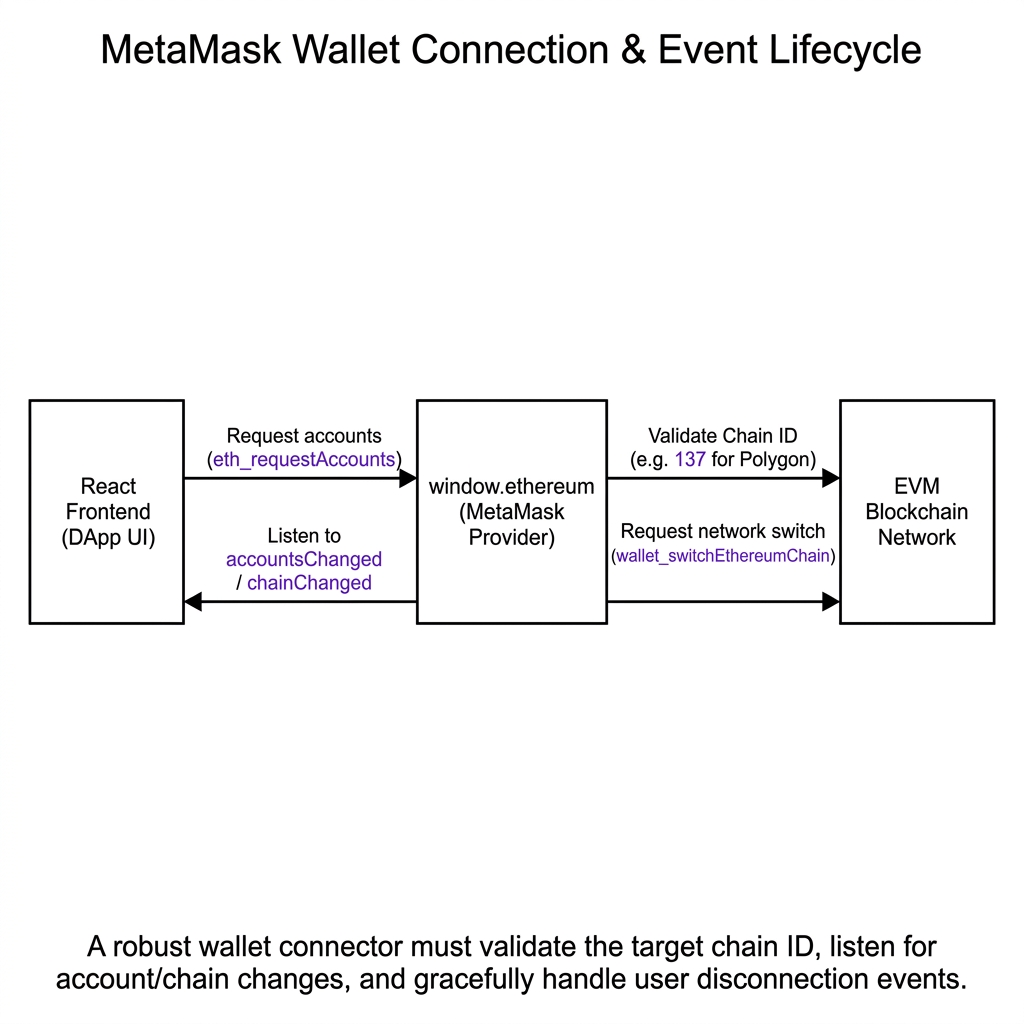
MetaMask Wallet Connection & Event Lifecycle
A robust wallet connector must validate the target chain ID, listen for account/chain changes, and gracefully handle user disconnection events.

3. Technical Explanation: The Production Connection Pattern

Here is the full, production-grade wallet connection from ChainElect, with network validation and event listeners:

rpc-amoy.polygon.technology
javascript
// context/src/components/Conn_web.jsx (production version)
const connectWallet = async () => {
  // 1. Check MetaMask is installed
  if (!window.ethereum) {
    alert('Please install MetaMask to use ChainElect.');
    return;
  }
 
  try {
    // 2. Request account access
    const accounts = await window.ethereum.request({
      method: 'eth_requestAccounts'
    });
 
    // 3. Check the current chain ID
    const chainId = await window.ethereum.request({ method: 'eth_chainId' });
    const requiredChainId = '0x13882'; // Polygon Amoy (80002 in hex)
 
    if (chainId !== requiredChainId) {
      try {
        // 4a. Try to switch automatically
        await window.ethereum.request({
          method: 'wallet_switchEthereumChain',
          params: [{ chainId: requiredChainId }],
        });
      } catch (switchError) {
        // 4b. Chain not added to MetaMask yet — add it
        if (switchError.code === 4902) {
          await window.ethereum.request({
            method: 'wallet_addEthereumChain',
            params: [{
              chainId: requiredChainId,
              chainName: 'Polygon Amoy Testnet',
              rpcUrls: ['https://rpc-amoy.polygon.technology'],
              nativeCurrency: { name: 'MATIC', symbol: 'MATIC', decimals: 18 },
              blockExplorerUrls: ['https://www.oklink.com/amoy'],
            }],
          });
        }
      }
    }
 
    // 5. Load contract
    const web3 = new Web3(window.ethereum);
    const contractInstance = new web3.eth.Contract(contractABI, contractAddress);
 
    setAccount(accounts[0]);
    setContract(contractInstance);
 
    // 6. Listen for account and network changes
    window.ethereum.on('accountsChanged', (newAccounts) => {
      setAccount(newAccounts[0] || null);
      window.location.reload(); // simplest safe approach
    });
 
    window.ethereum.on('chainChanged', () => {
      window.location.reload(); // chain changed — reload and re-validate
    });
 
  } catch (error) {
    if (error.code === 4001) {
      console.log('User rejected the connection request.');
    } else {
      console.error('Connection error:', error);
    }
  }
};

The key additions vs the naive version:

  1. Chain ID validation — detect wrong network before allowing interaction
  2. Automatic chain switchingwallet_switchEthereumChain prompts the user to switch
  3. Chain addition fallback — if the chain isn't added yet, wallet_addEthereumChain adds it
  4. Event listenersaccountsChanged and chainChanged prevent stale state after MetaMask changes

// Reality Check

The wallet_switchEthereumChain and wallet_addEthereumChain methods only work in MetaMask and MetaMask-compatible wallets (like Coinbase Wallet). If you're building for WalletConnect or other wallet protocols, you'll need a library like wagmi or RainbowKit that abstracts these calls across wallet providers. In Track 4, we replace this entire pattern with Account Abstraction, eliminating the chain management problem entirely.

— Production Engineering Principle

// I Got This Wrong

The Missing Event Listener Trap: If you don't listen to accountsChanged, users who switch MetaMask accounts mid-session will have your UI showing the old account while MetaMask is signing transactions with the new one. This causes transactions to be sent from the wrong address — a confusing, hard-to-diagnose bug. Always register account change listeners immediately after connection.

— Postmortem Confession

System Design Challenge
Think Active

In the ChainElect Conn_web.jsx source file, find where the chainChanged event listener is registered. What does the handler do when the chain changes? Now think about a better approach than window.location.reload() — what would you show the user instead of a full page reload?

[ Think Before Continuing ]

Was this lesson helpful?

Let us know what you think of this specification. (submitting anonymously)