We've covered why indexers exist and how The Graph works conceptually. Now let's actually build one for ChainElect.
By the end of this lesson, you'll have a deployed subgraph that answers the question:
"Give me the top 10 candidates sorted by vote count."
With instant response time, no RPC calls, and no on-chain read limits.
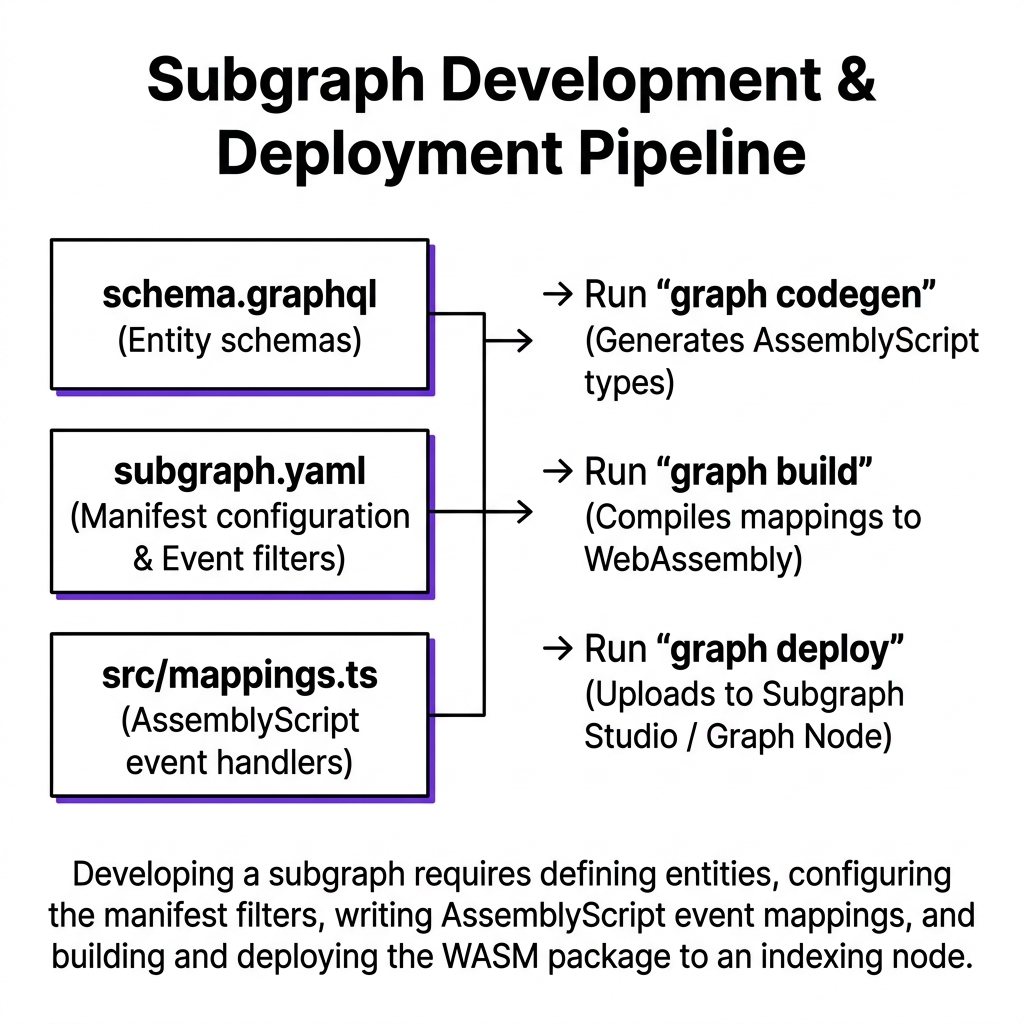
Developing a subgraph requires defining entities, configuring the manifest filters, writing AssemblyScript event mappings, and building and deploying the WASM package to an indexing node.
Candidate.votes uses @derivedFrom — it's not stored, but computed from VoteRecord.candidate references. This gives you candidate → all votes without storing duplicate data.
VoteRecord is immutable: true — votes never change, so The Graph can optimize storage.
ElectionStatus is a singleton entity (id: "status") representing the global voting state.
// src/mapping.tsimport { CandidateAdded, Voted, VotingStarted, VotingEnded, VoterRegistered} from "../generated/MyContract/MyContract";import { Candidate, Voter, VoteRecord, ElectionStatus } from "../generated/schema";import { BigInt } from "@graphprotocol/graph-ts";let candidateCounter = 0; // Note: use a Counter entity in productionexport function handleCandidateAdded(event: CandidateAdded): void { candidateCounter++; let id = candidateCounter.toString(); let candidate = new Candidate(id); candidate.name = event.params.name; candidate.voteCount = BigInt.fromI32(0); candidate.save();}export function handleVoted(event: Voted): void { let candidateId = event.params.candidateId.toString(); let voterAddress = event.params.voter.toHex(); // Update candidate vote count let candidate = Candidate.load(candidateId); if (candidate) { candidate.voteCount = candidate.voteCount.plus(BigInt.fromI32(1)); candidate.save(); } // Update voter status let voter = Voter.load(voterAddress); if (!voter) { voter = new Voter(voterAddress); voter.hasVoted = false; voter.registeredAt = BigInt.fromI32(0); } voter.hasVoted = true; voter.votedFor = candidateId; voter.save(); // Create immutable vote record let voteId = event.transaction.hash.toHex() + "-" + event.logIndex.toString(); let vote = new VoteRecord(voteId); vote.voter = voterAddress; vote.candidate = candidateId; vote.blockTimestamp = event.block.timestamp; vote.transactionHash = event.transaction.hash; vote.save();}export function handleVotingStarted(event: VotingStarted): void { let status = ElectionStatus.load("status"); if (!status) status = new ElectionStatus("status"); status.isActive = true; status.startTime = event.block.timestamp; status.endTime = event.params.endTime; status.save();}export function handleVotingEnded(_event: VotingEnded): void { let status = ElectionStatus.load("status"); if (!status) return; status.isActive = false; status.save();}export function handleVoterRegistered(event: VoterRegistered): void { let voterAddress = event.params.voter.toHex(); let voter = Voter.load(voterAddress); if (!voter) { voter = new Voter(voterAddress); voter.hasVoted = false; } voter.registeredAt = event.block.timestamp; voter.save();}
5. Deploy to Subgraph Studio
terminal
bash
# Build the subgraph (compiles AssemblyScript to WASM)graph codegen && graph build# Authenticate with Subgraph Studiograph auth --studio <YOUR_DEPLOY_KEY># Deploygraph deploy --studio chainalect-subgraph
6. Query Your Data
After deployment, query the GraphQL endpoint:
SmartAccount.sol
graphql
# Top 5 candidates by votesquery Leaderboard { candidates(orderBy: voteCount, orderDirection: desc, first: 5) { id name voteCount }}# All votes for candidate ID 1query CandidateVotes { voteRecords(where: { candidate: "1" }, orderBy: blockTimestamp, orderDirection: desc) { voter { id } blockTimestamp transactionHash }}# Current election statusquery ElectionStatus { electionStatus(id: "status") { isActive startTime endTime }}
These queries resolve in under 100ms — no RPC calls, no blockchain reads, no rate limits.
The startBlock Oversight:
If you don't specify startBlock in subgraph.yaml, The Graph will index from block 0 — scanning the entire blockchain history. For a contract deployed at block 12,000,000 on Polygon, this means processing 12 million empty blocks before reaching your data. Always set startBlock to your contract's deployment block. Find it on PolygonScan → your contract → "Contract Creator" transaction block number.
System Design Challenge
Think Active
Deploy the ChainElect subgraph to Subgraph Studio. Cast 3 votes from your MetaMask wallet to different candidates. Wait 30-60 seconds for the indexer to process the blocks. Then query the leaderboard endpoint and verify that your votes appear. Now write a query that returns all VoteRecord entities for a specific voter address. Does the result match what you see on-chain via Etherscan?
[ Think Before Continuing ]
Was this lesson helpful?
Let us know what you think of this specification. (submitting anonymously)