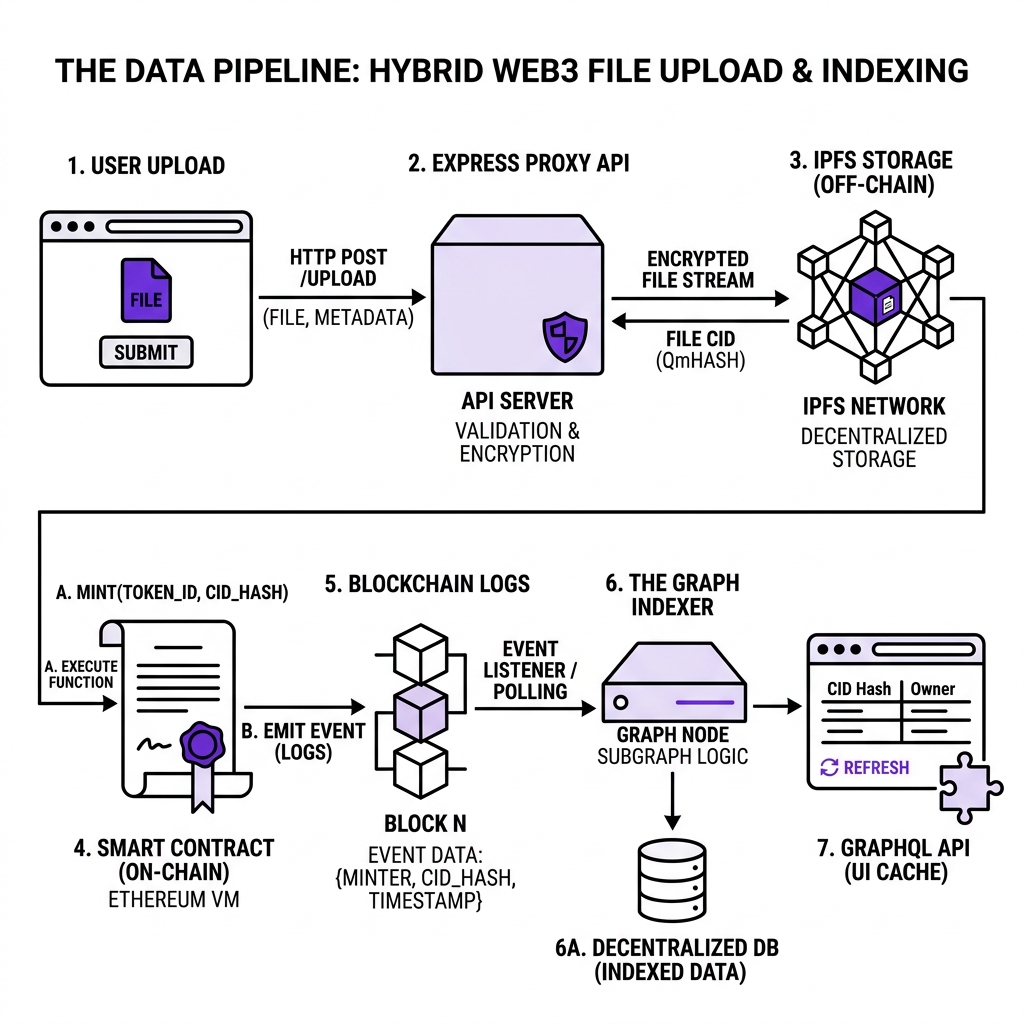
Dissecting the journey of an uploaded image through standard web servers, IPFS, the blockchain log registry, and graph indexers.
#data-flow #architecture #ipfs #indexing
Trace the path: files flow through API gateways to IPFS, metadata hashes commit to smart contracts on-chain, and emitted logs sync down to Graph indexers for low-latency queries.
In a standard Web2 app, data flows in a straight line:
SmartAccount.sol
text
Browser ──▶ Express API ──▶ Postgres DB ──▶ Express API ──▶ Browser
It is simple, fast, and centralized.
In a production Web3 system like Socio3, a single post upload triggers a multi-system choreograph involving decentralized storage, cryptographic registries, and indexers:
If you do not understand how data moves through this pipeline, you will write slow dApps and leak API credentials. Let's trace this journey step-by-step.
Phase 1: Client Upload and Compression (The Frontend)
A user uploads a 4MB high-res photo to Socio3.
Client-Side Compression: The browser captures the file and compresses it down to ~500KB using Canvas rendering APIs to conserve IPFS storage and ensure fast retrieval.
Form Data Packing: The frontend binds the compressed image into a standard FormData payload alongside the post text.
Phase 2: The Gateway and Key Isolation (The Backend)
The browser never talks to IPFS directly. If it did, your Pinata API keys would be exposed inside the client-side JavaScript bundle.
The Express Proxy: The client sends the file to your Node.js gateway (POST /api/upload).
Credential Protection: The Express server intercepts the upload, validates the user session, and appends the secure IPFS credentials (kept strictly in server .env variables).
Pinning: The Express server uploads the file to Pinata (IPFS), receiving a unique content-addressed identifier (CID):
SmartAccount.sol
text
QmXyZ... (46-character hash)
Phase 3: The Cryptographic Notary (The Blockchain)
Storing the image CID metadata inside Express is not Web3; storing it on-chain is.
Payload Packaging: The Express backend returns the IPFS CID to the client.
Metadata Compilation: The frontend creates a metadata JSON file linking the image CID and caption, uploads it to IPFS, and receives a second CID (QmMetadata...).
Transaction Signature: The user signs a transaction calling PostContract.createPost("QmMetadata...").
State Storage: The Solidity contract records the transaction. It does not store the image or text. It only maps the QmMetadata... hash to the user's smart account address:
SmartAccount.sol
solidity
mapping(uint256 => Post) public posts; // Struct stores string ipfsHash
Gas cost: ~$0.003 on Polygon Amoy.
Phase 4: Event Emission and Propagation (The Indexer)
Once the transaction is validated by block miners, the PostCreated event is emitted:
At this moment, the data is permanent, but unsearchable. If the frontend wants to display a feed of posts, it cannot run SELECT * FROM posts against a Polygon node.
The Graph Listeners: The Graph indexer node monitors Polygon block state. It catches the PostCreated event.
Handler Mapping: The Graph node runs an AssemblyScript handler mapping the event parameters:
types.ts
typescript
export function handlePostCreated(event: PostCreatedEvent): void { let post = new Post(event.params.postId.toString()); post.author = event.params.author; post.ipfsHash = event.params.ipfsHash; post.createdAt = event.block.timestamp; post.save();}
Data Hydration: The Graph automatically fetches the IPFS metadata file, extracts the caption and image links, and caches them inside its internal database.
Phase 5: Hydrated Feed Loading (The Loop Completes)
The user's feed loads:
GraphQL Query: The frontend queries The Graph's GraphQL endpoint:
Instant Rendering: The GraphQL database returns the hydrated feed in under 150ms. The user sees their post.
A common design failure is attempting to bypass the indexer by reading directly from contracts during feed render. If you do this, your app will take 5+ seconds to load a simple list of posts, hitting public RPC provider limits immediately.
System Design Challenge
Think Active
Trace the data flow of a decentralized supply-chain trace (like ChainCure). When a QR code on a bottle of medicine is scanned by a regulator:
What data flows from the QR code to the scanner?
What on-chain state variables are checked?
Where is the drug batch manufacturing metadata retrieved from?
Sketch the pipeline in your notepad.
[ Think Before Continuing ]
Was this lesson helpful?
Let us know what you think of this specification. (submitting anonymously)