
Transactions explained visually
From, to, value, data, signature. What happens when you press send. The mempool.
When you click "Send" in Metamask, it feels like sending an email. You specify the recipient, write an amount, click confirm, and a few seconds later it arrives.
But under the hood, a transaction is not a message pushed to a server. It is a cryptographic instruction broadcast to a peer-to-peer network, waiting to be processed by miners or validators.
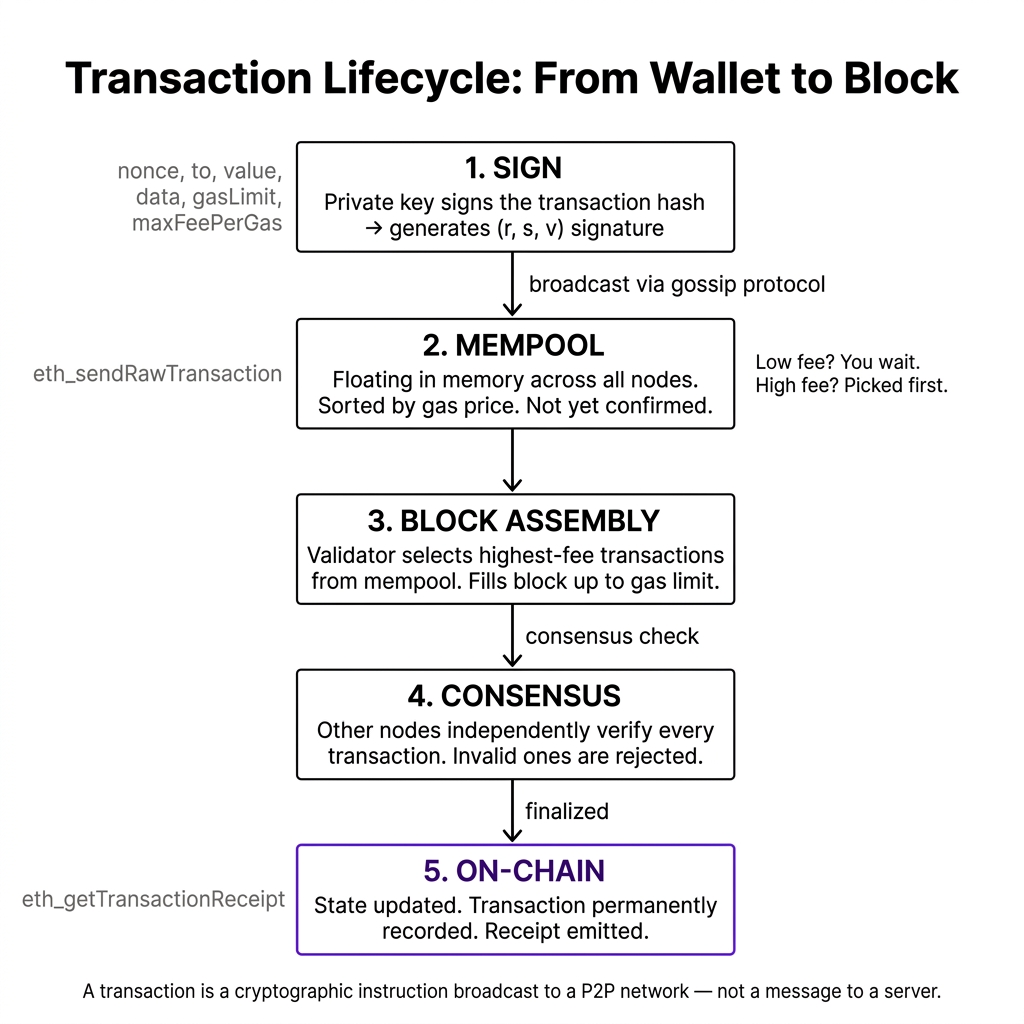
Let's look at the lifecycle of a transaction, from your wallet to the block.
1. The Anatomy of a Transaction Payload
A transaction is a structured JSON-like data package containing specific fields:
- Nonce: Crucial for security. The network will only process transaction
nonce: 4ifnonce: 3has already been processed. This prevents transaction reordering or replay attacks. - Data: This is how we interact with smart contracts. If you interact with a Uniswap contract, this field contains the ABI-encoded function call.
2. Layman Explanation: The Sealed Letter in the Post Box
Imagine you want to transfer ownership of a car to Bob.
- You write a letter: "I, Alice, transfer ownership of Car ID 99 to Bob. Nonce count: 4."
- You sign it with a special wax seal stamp that only you possess (private key signature).
- You drop this letter into a public post box in the town square.
This post box is the Mempool (Memory Pool). It is a giant pile of letters waiting to be processed.
The postal workers (validators/miners) stand around the box. Because there are too many letters, they look at the stamps: letters that include a tip (priority fee) are grabbed first.
A worker picks up your letter, verifies the wax seal matches Alice's signature (public key verification), checks if Alice actually owns Car ID 99, and if valid, glues the letter onto the official town registry ledger (the block).
3. Technical Explanation: The Transaction Lifecycle
Here is the exact lifecycle of a transaction as it travels through the network:
- Signing: Your private key signs the hash of the transaction fields, generating three values:
r,s, andv. This signature proves you authorized the transaction, and because it is tied to the transaction hash, modifying any field (like changing the recipient) breaks the signature check. - Broadcasting: The transaction is gossiped across the peer-to-peer network. Every full node checks the signature and balance, then adds it to their local Mempool (temporary storage for pending transactions).
- Mempool Selection: Miners/Validators select transactions from their mempools. Since block space is limited, they sort them by gas price to maximize profit.
- Execution: The validator runs the transaction against the current state database. If successful, state changes are written into a new block, which is appended to the chain.
You initiate the transaction in your wallet app (MetaMask, Privy, etc.). You specify the recipient address, amount, and optionally gas settings.
Many beginners think the wallet "processes" the transaction. It doesn't — it only prepares and signs it.
Writing a cheque: you fill in the amount and recipient, then sign it. The bank hasn't seen it yet.
If you submit a transaction with gas fees set too low during a high-traffic network event, what happens to your transaction inside the mempools of nodes? Does it revert, or does it sit pending?
Visual Blockchain Simulator
In the Visual Blockchain Simulator, we implement the transaction mempool panel. You will code the UI that lists pending transactions, shows them moving from a wallet signing panel to a queue, and simulates how nodes pull them from the queue to assemble new blocks.
- Node propagation
- P2P communication
- Block formation
- Gas fee mechanics
Was this lesson helpful?
Let us know what you think of this specification. (submitting anonymously)