
What MetaMask actually does — and doesn't do
It's a key manager, not a vault. Coins live on-chain, not in MetaMask. UX challenges.
Here's a confession: I genuinely believed for the first three months of learning Web3 that "my ETH was inside MetaMask." I thought the orange fox was some kind of digital safe. When a transaction failed, I once asked a friend "is MetaMask down?"
I was completely wrong. MetaMask is not a wallet. It is a key manager. Your coins have never touched MetaMask's servers.
1. The Problem: Digital Identity Without a Central Authority
In traditional banking, your identity is managed by the bank. You log in with a password, the bank verifies it against their database, and they grant access to your balance.
On a public blockchain, there is no bank. There is no login server. There are no passwords. The blockchain accepts transactions from anyone — but only if those transactions include a valid cryptographic signature that mathematically proves the sender owns the private key corresponding to the account address.
The problem is: How do you securely sign transactions without a server?
2. Layman Explanation: The Rubber Stamp That Only You Own
Your private key is like a one-of-a-kind rubber stamp carved in a way that is impossible to duplicate. Anyone in the world can verify the stamp's imprint matches your stamp, but only you can make the imprint.
When you want to authorize a blockchain transaction — like sending 0.1 ETH to Bob — you press your private key rubber stamp onto the transaction document. Every node in the world can then verify "yes, this stamp matches the expected stamp for this address."
MetaMask is the secure box you keep your rubber stamp in. It:
- Stores your private key (encrypted, with a password)
- Shows you transactions that websites want you to sign
- Applies the cryptographic stamp (signature) on your behalf
- Sends the signed transaction to the blockchain
That's it. MetaMask does not hold your ETH. It does not communicate with Ethereum directly (it talks to an RPC provider like Infura). Your ETH balance is stored as a number in the Ethereum global state — a distributed database running on thousands of computers worldwide.
3. Technical Explanation: The Key Manager Architecture
// MetaMask manages private keys locally in the browser. Your assets exist entirely on the public blockchain state — MetaMask never holds them.
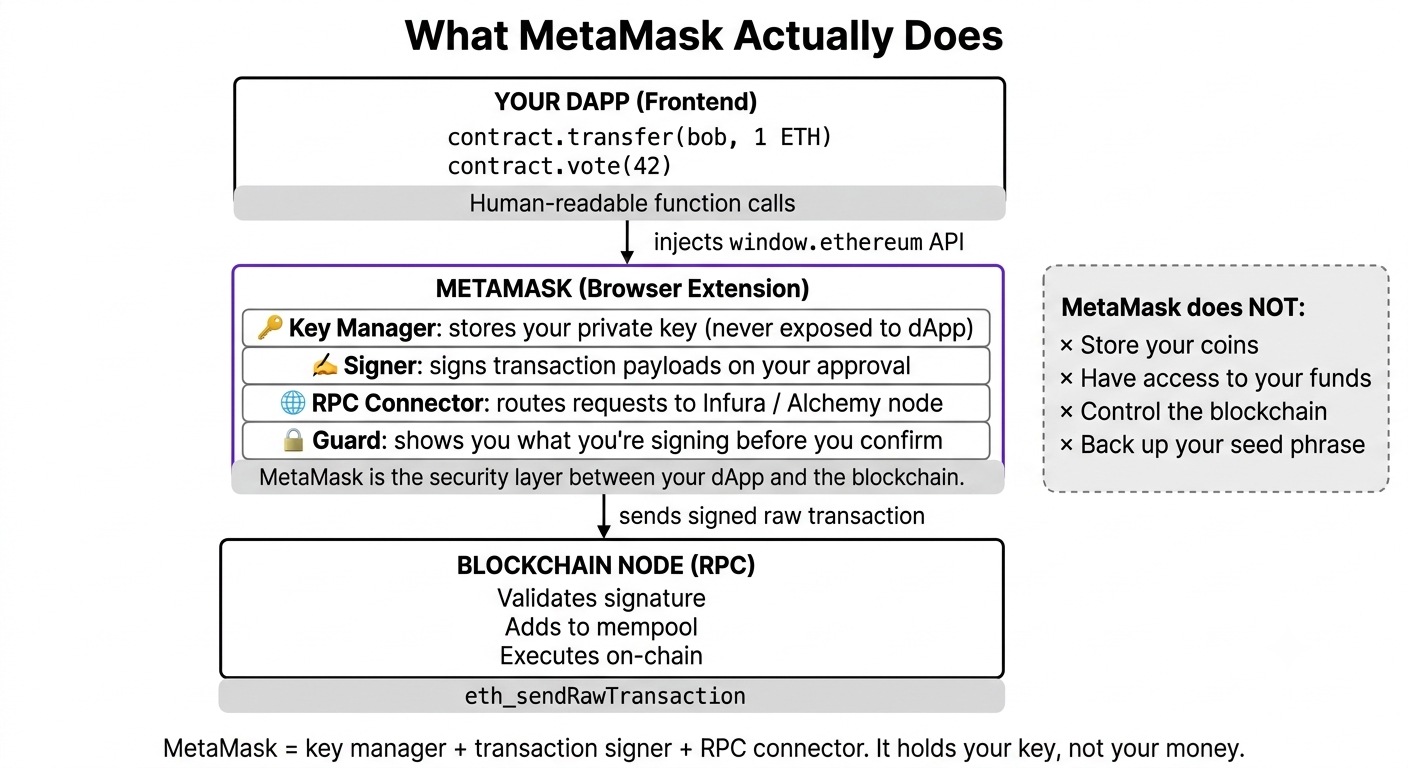
Inside MetaMask's architecture:
- Key Storage: Your private key is stored in the browser's
localStorage, AES-256 encrypted with the password you chose. It never leaves your device. - Signature Generation: When a dApp calls
window.ethereum.request({ method: 'eth_sendTransaction' }), MetaMask intercepts, shows you the transaction details, and if you confirm, it uses the Web Crypto API to generate an ECDSA signature locally. - RPC Relay: The signed transaction (raw hexadecimal bytes) is sent to Infura's RPC endpoint, which then broadcasts it to the Ethereum P2P network.
MetaMask never knows your balance. It reads it from Infura's RPC response to eth_getBalance. Infura never holds your funds either — it just reads the public blockchain state.
4. Real-World Usage: The MetaMask UX Failure Mode
MetaMask is powerful for developers and early adopters. But for real consumer apps, it falls apart:
- Mobile UX: MetaMask only exists as a browser extension. On iOS Safari, there is no extension support. Mobile users need to use a separate MetaMask mobile app with a clunky deep-link flow.
- Seed Phrase Onboarding: Asking a normal user to write down 12 random words in the correct order — and never lose them — is an insurmountable UX barrier.
- Network Switching: Your users shouldn't need to know the difference between Polygon Mainnet and Ethereum Mainnet. Yet MetaMask forces them to manually switch.
This is exactly why Track 4 of this curriculum covers Account Abstraction and Embedded Wallets — where users log in with Google and never see a seed phrase or MetaMask popup.
On production dApps built for real (non-crypto-native) consumers, MetaMask-first UX yields terrible conversion rates. Privy and similar embedded wallet providers report 60-80% higher onboarding completion rates than traditional wallet-connect flows. The future of Web3 UX is invisible wallets — users shouldn't know they have one.
I thought MetaMask was the blockchain. Asked a friend "is MetaMask down?" when a transaction failed. MetaMask is just a key manager. The blockchain runs completely independently. If a transaction fails, check the network, your nonce, your gas limit — not MetaMask's status page.
Open MetaMask and look at the "Account Details" screen. You'll see an option to export your private key. Now think: if your private key can be exported as a string of hex characters, what's actually preventing someone with physical access to your computer (and your password) from stealing all your funds?
Visual Blockchain Simulator
The simulator includes a "Key Manager" panel showing how a private key signs a transaction locally, and how a different address receives it. This lesson's mental model — keys live in browser, funds live on-chain — is visualized directly in this interactive panel.
- Node propagation
- P2P communication
- Block formation
- Gas fee mechanics
Was this lesson helpful?
Let us know what you think of this specification. (submitting anonymously)