
Seed phrases — brilliant security, terrible UX
BIP-39 mnemonic. HD wallet derivation paths. Why 12 words = full account control.
I tried to show ChainCure to a friend on their iPhone. Here's what happened:
- "Download this app called MetaMask"
- "Create an account... okay now write down these 12 words"
- "Wait, on paper? Like, physical paper?"
- "Yes, and don't screenshot them"
- "Okay... now open the in-app browser"
- "No, not Safari. The browser inside MetaMask"
- "Now type the URL manually..."
- "Now approve this connection popup..."
- "Now switch to Polygon network..."
- "Now you need MATIC tokens for gas..."
My friend stopped at step 3. They looked at me like I was insane. And honestly? They were right. This UX is insane. And it's the single biggest reason Web3 hasn't achieved mass adoption yet.
1. The Problem: Secure Key Storage That Humans Can Actually Use
Here's the fundamental tension:
Your blockchain identity is a 256-bit private key — 64 hexadecimal characters. If you lose it, your funds are gone forever. If someone copies it, your funds are gone forever. There's no "forgot my password" because there's no server that stores your credentials.
So how do you back up a 64-character hex string in a way that normal humans can handle?
Answer: BIP-39 Mnemonic Encoding. Convert the private key entropy into 12 (or 24) human-readable English words. The words are easier to write down, verify, and store than raw hex.
But this solution, while cryptographically elegant, creates a UX disaster for consumer applications.
2. Layman Explanation: The Master Key Problem
Imagine your house has a single master key that:
- Opens every room, every safe, every vault
- Cannot be duplicated by a locksmith
- Cannot be replaced if lost
- Anyone who finds it has permanent access to everything you own
- There's no security camera, no police, no insurance
That's your seed phrase. It's the most powerful and most dangerous credential you'll ever handle. And we give it to people as their very first interaction with Web3.
Compare this to how you log into Instagram: type your email, click a link, done. If you forget your password, tap "Reset." If someone hacks your account, customer support can help.
In Web3, there is no reset. There is no customer support. There is only the 12 words.
3. Technical Explanation: BIP-39 and HD Wallets
How Seed Phrases Work:
The HD (Hierarchical Deterministic) Wallet Tree:
One seed phrase generates an infinite number of accounts:
4. The Mobile Web3 Nightmare
// The MetaMask mobile onboarding flow requires 8 steps and ~20 minutes. A modern embedded wallet requires 2 steps and ~7 seconds. This gap explains why Web3 adoption stalls.
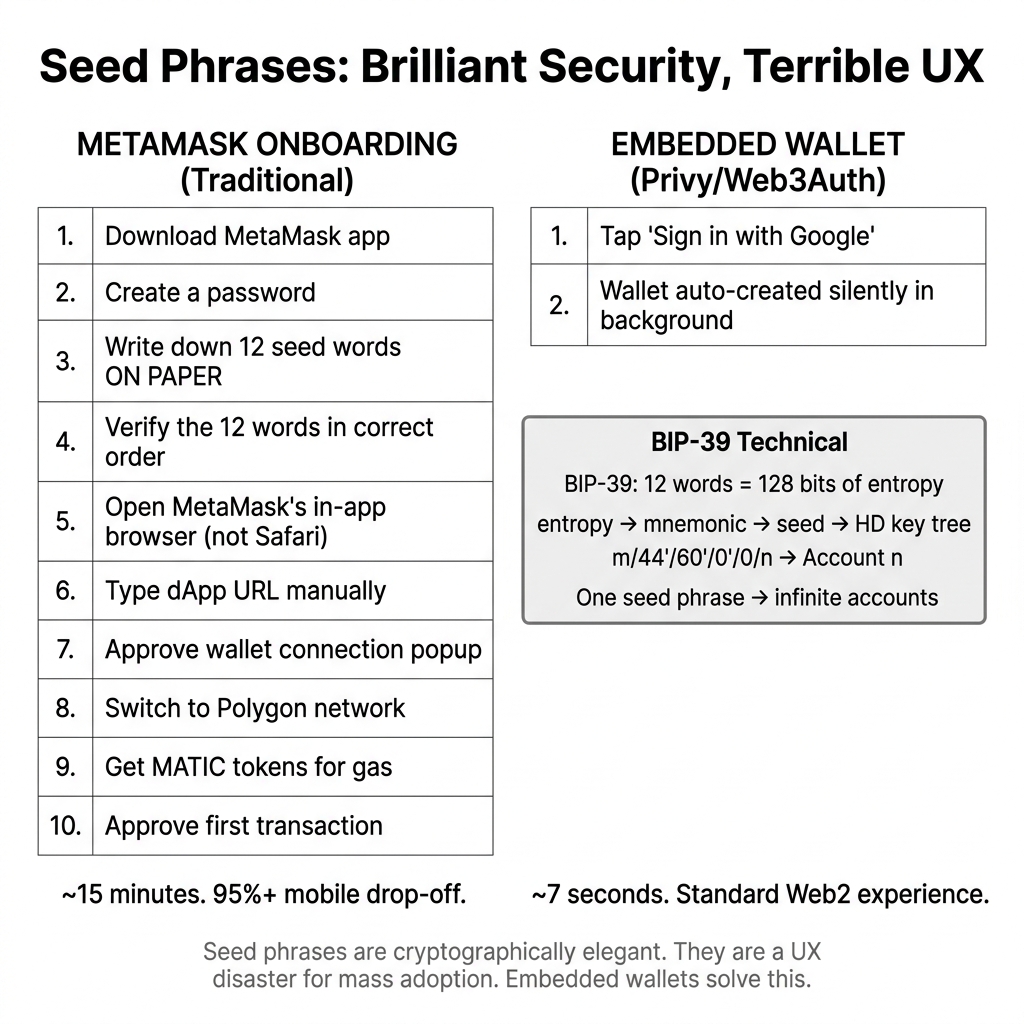
On desktop, MetaMask is a browser extension. It's clunky but functional. On mobile, it's a catastrophe:
iOS (iPhone):
- Safari does not support browser extensions
- Users must download the MetaMask app
- The MetaMask app has its own built-in browser (not Safari, not Chrome)
- dApps must be accessed through this in-app browser
- Copy-pasting URLs between Safari and MetaMask in-app browser is confusing
- WalletConnect (the QR code alternative) has frequent connection drops
Android:
- Chrome does not support MetaMask extension on mobile
- Same MetaMask app + in-app browser requirement
- Deep linking between apps is fragile and version-dependent
The result: A 95%+ drop-off rate for non-crypto-native mobile users.
5. The Solution: Embedded Wallets
This mobile nightmare is exactly why Privy, Web3Auth, Dynamic, and similar providers exist. They flip the entire model:
The private key still exists — it's just managed by Privy's Hardware Security Module (HSM) infrastructure instead of by the user. The user authenticates with Google/Apple/email, and Privy handles the cryptography invisibly.
This is the entire motivation for Track 4 of this curriculum.
Embedded wallets trade self-custody for UX. Users trust Privy's infrastructure to secure their keys, similar to how users trust banks with their money. For consumer apps (games, social, voting), this tradeoff is almost always correct. For high-value DeFi or long-term holdings, self-custody (MetaMask, hardware wallets) is still recommended. Match your wallet architecture to your risk profile.
Tried to demo ChainCure to a non-technical friend on their iPhone. Spent 15 minutes on MetaMask setup — they never even saw the actual app. The demo was ruined. Built the next project (Socio3 Evolution) with Privy from day one. Onboarding went from 15 minutes to 7 seconds. The product thinking lesson: your authentication UX IS your product for most users.
"If Privy holds my private key, can't they steal my funds?"
Privy uses a technique called key sharding — the private key is split into multiple pieces stored across separate HSMs (Hardware Security Modules). No single Privy employee or system has access to a complete key. Additionally, for high-value accounts, users can export their private key from Privy at any time to take full self-custody. The trust model is: you trust Privy's infrastructure security, not any individual person at Privy.
Ask a non-technical friend or family member to try creating a MetaMask wallet on their phone. Time how long it takes them. Note where they get confused. Compare that experience to signing up for any Web2 app. This exercise will permanently change how you think about Web3 onboarding.
Visual Blockchain Simulator
The Visual Blockchain Simulator includes a Wallet UX Comparison panel: on the left, a simulated MetaMask onboarding flow with each step visualized as a friction point; on the right, a simulated Privy embedded wallet flow showing the same end result (signed transaction) achieved in two clicks. This lesson's mobile pain analysis drives the comparison logic.
- Node propagation
- P2P communication
- Block formation
- Gas fee mechanics
Was this lesson helpful?
Let us know what you think of this specification. (submitting anonymously)